Features
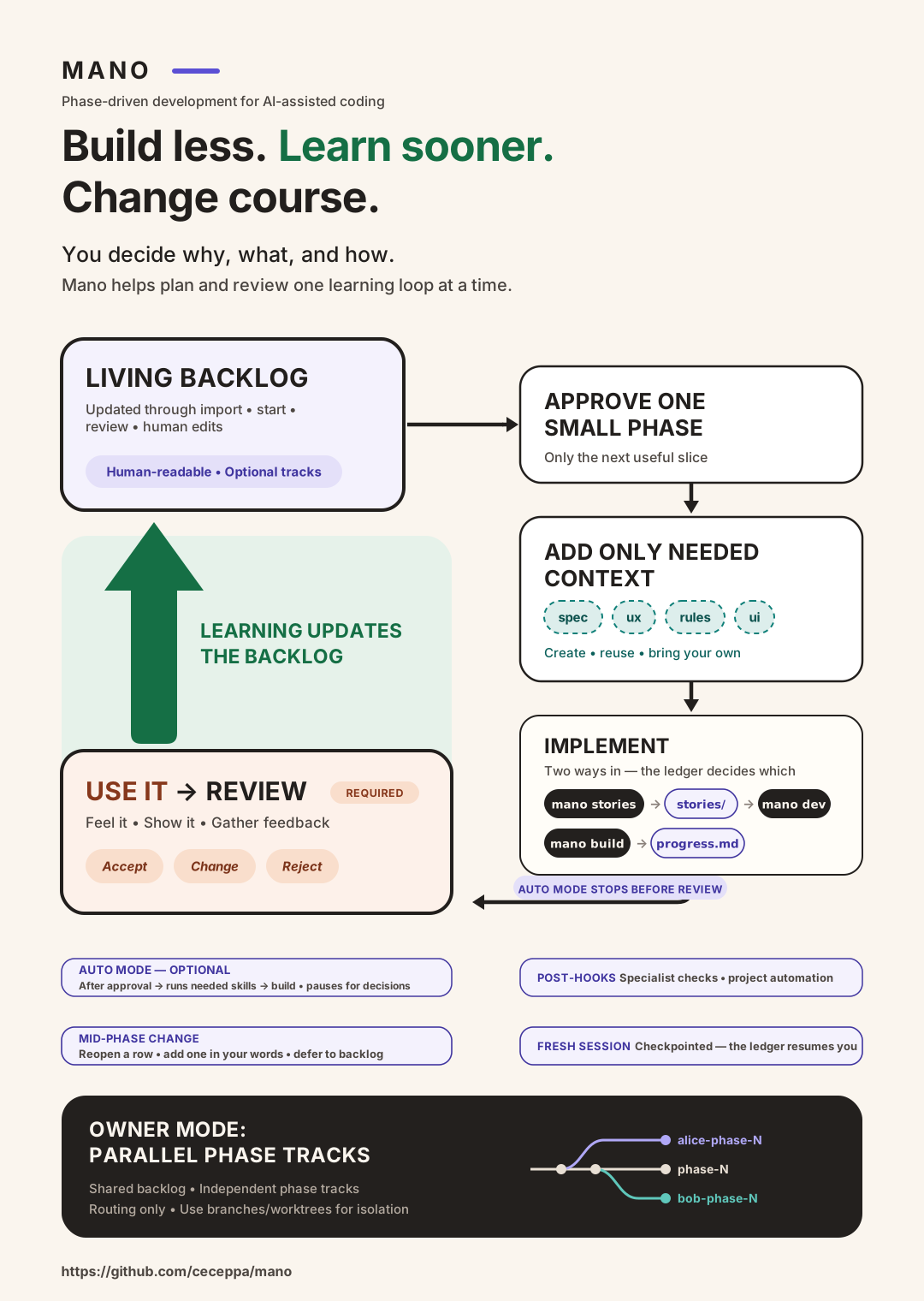
The loop — start → spec → rules → stories → dev → review — is the default and covers most phases. These are the parts you reach for when a project grows past it.
| What it is | When you need it | |
|---|---|---|
| Build mode | Implement a phase straight from its approved brief, no story files | The phase is small enough to hold in one contract |
| Auto mode | Chain the commands you'd otherwise type, armed only by your scope approval | You've read enough briefs to trust their shape |
| Import | Turn an existing PRD or document into a backlog, then stop | You already wrote the requirements somewhere else |
| Team owners | Namespace phases per person, so two people don't both scope "phase 7" | More than one person planning in one repo |
| Tracks & filters | Narrow what a phase is allowed to contain | The backlog has absorbed several documents |
| Hooks | Wire your own review checklist into any skill | You've made the same correction three phases running |
Everything here is optional. Nothing is on by default, and nothing arms itself.
Owner JSON files
Mano saves portable settings and chain state in _mano_output/[owner].json. Each owner has a separate file that you can commit with the project.
| File | What it contains | Commit it? |
|---|---|---|
_mano_output/alice.json | Alice's mode, track, and chain records by phase | Yes, to resume elsewhere |
_mano_output/.default.json | The same settings for work without an owner | Yes, if used |
_mano_output/.local.json | The owner selected in this checkout | No; Mano adds it to _mano_output/.gitignore |
Use these commands in your agent's chat to create or update the files:
mano owner alice
mano mode auto
mano track "Option B"
A new owner starts in manual mode with no track. Selecting an existing owner restores that owner's saved settings. Bare mano owner, mano mode, and mano track show the effective values. mano mode clear resets the mode to manual; mano track clear resets the track to null. mano owner clear selects the unowned .default.json settings without deleting any owner's file.
An owner file with an approved chain in progress looks like this:
{
  "version": 1,
  "owner": "alice",
  "mode": "auto",
  "track": "Option B",
  "phases": {
    "alice-phase-1": {
      "skipped": ["ux"],
      "run": {
        "actions": ["ui", "build"],
        "repairs": []
      }
    }
  }
}| Field | Meaning |
|---|---|
version | Settings format version; currently 1 |
owner | Owner slug matching the filename; null in .default.json |
mode | manual or auto |
track | Active work track, or null for none |
phases | Chain records keyed by the exact phase ID |
skipped | Planning actions the human explicitly removed from this phase's chain |
run.actions | Remaining approved actions, in order; a nonempty list ends with build or dev |
run.repairs | Artifact actions already given an automatic repair attempt in this run |
run: null means there is no saved approval. A run with "actions": [] means the approved chain has finished. These records accompany the phase artifacts and implementation ledgers; they do not replace them. Mano updates the chain fields as approved actions finish, so use the commands to manage them rather than reconstructing approval by editing JSON.
The local selection contains only:
{ "owner": "alice" }To continue on another computer:
- Commit and push the owner JSON together with the phase artifacts and code.
- Clone or pull the project on the other computer.
- Run
mano owner aliceonce in that checkout, thenmano continue.
MANO_OWNER, MANO_MODE, and MANO_TRACK override the stored values for a shell or worktree without saving those overrides. Empty overrides are errors. Settings work without a Git repository; Git is only needed when you want to commit and share them.
Existing settings from older Mano versions migrate automatically when corresponding JSON state is missing. Existing JSON values win, including cleared settings and completed chains.